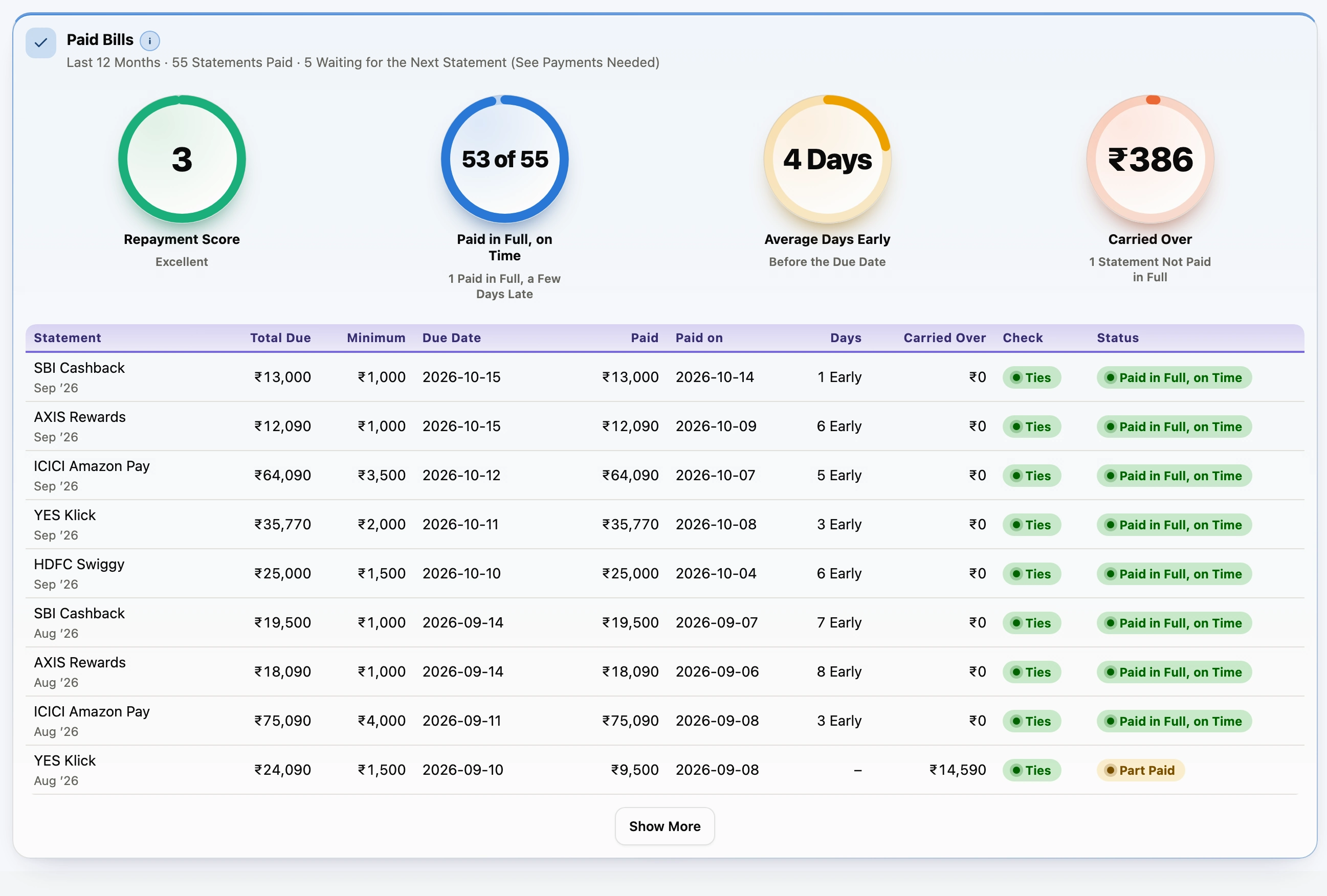
Bills that tie out, and a record of paying them
Each statement is matched to the payments that follow it, with days early or late and a repayment score. A bill shows Ties only when its lines add up to the bank's own total.
A private money dashboard that runs on your own computer
Drop in your credit card and bank statement PDFs. Get plain answers to the questions you actually ask, and see each bill checked so the numbers add up.
Answers to questions like
Free demo with sample data. Early supporters get a founding-member price. No spam, unsubscribe any time. Windows version coming soon.
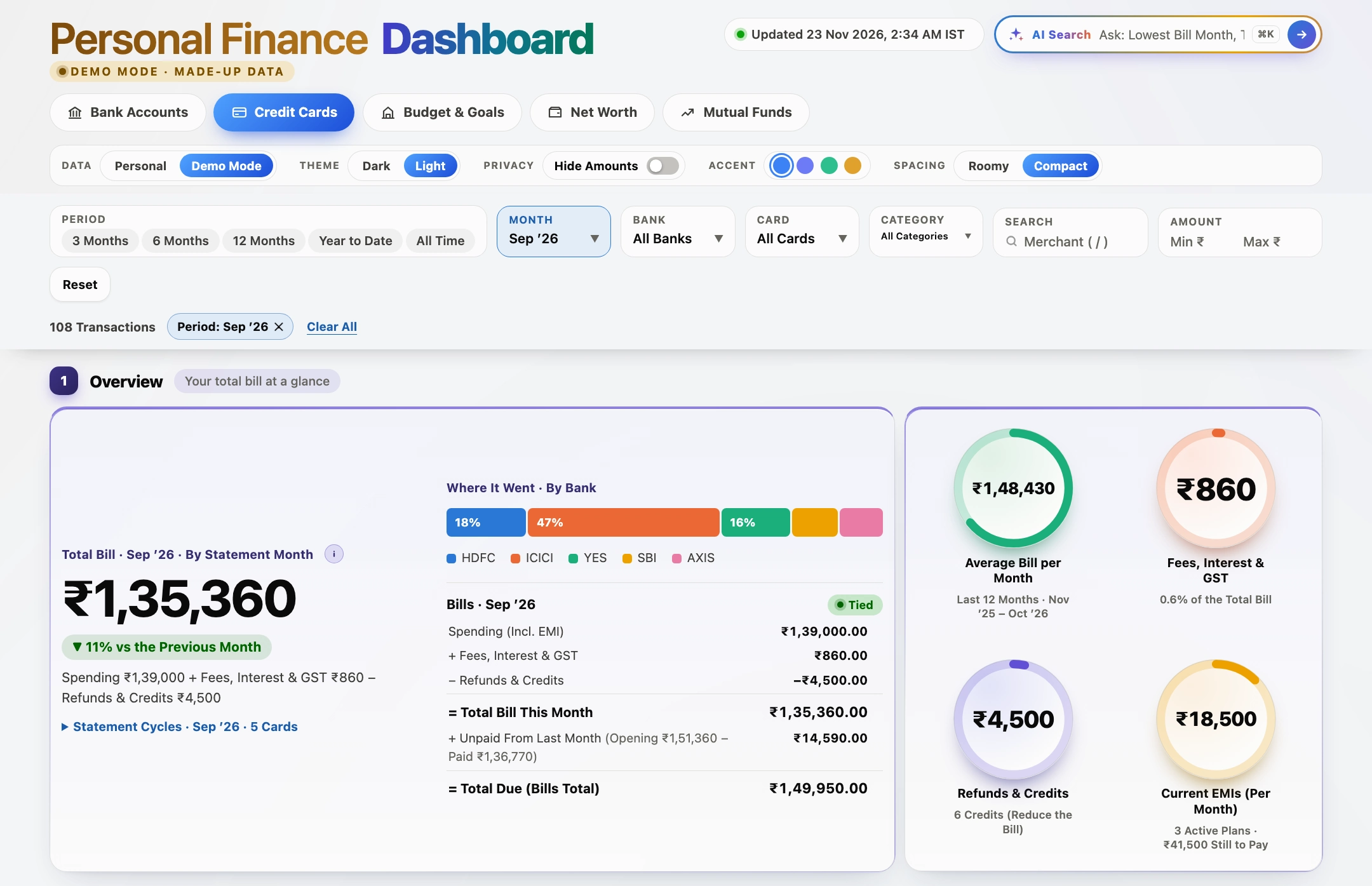
Each card closes on a different date. See one picture that matches the bills you actually pay.
No login, no upload and no consent link. You hand over PDFs you already have, on your own computer.
Every bill shows whether it ties out, and every fee, interest and GST line is listed.
Not for you if you want a phone-only app or automatic bank sync without handling statement PDFs.
Cards close on different dates, refunds land in odd months, and fees hide in the small print. This tool counts every transaction in the month of the bill it belongs to, so the numbers match what you actually pay.
Use the PDFs your bank already sends you.
Totals are checked: opening plus money in minus money out equals closing.
Spend by statement month, debts, net worth and budgets.
No bank login. No upload. No account aggregator. Your statements are read on your computer and stay there.
Statement PDF passwords are kept in the macOS Keychain. They are never written to files, logs or the dashboard.
Data folders are set to owner-only access, and account numbers are cut to the last four digits when read.
Before and after each rebuild the tool checks for stray passwords, card-like numbers, loose file permissions and unencrypted data, and stops if anything fails.
Press H to blur every amount, merchant and card digit, so you can share your screen or sit in a cafe safely.
If you want to view it on your phone, the data is encrypted on your computer first (AES-256-GCM, key from your passphrase) before it goes to your own Google Drive. Off by default.
The dashboard loads no external scripts or fonts and makes no outside requests.
Every picture below uses sample data for a made-up household, produced by the same code and checks as the real thing.
Tap or click any picture to enlarge it.
Each statement is matched to the payments that follow it, with days early or late and a repayment score. A bill shows Ties only when its lines add up to the bank's own total.
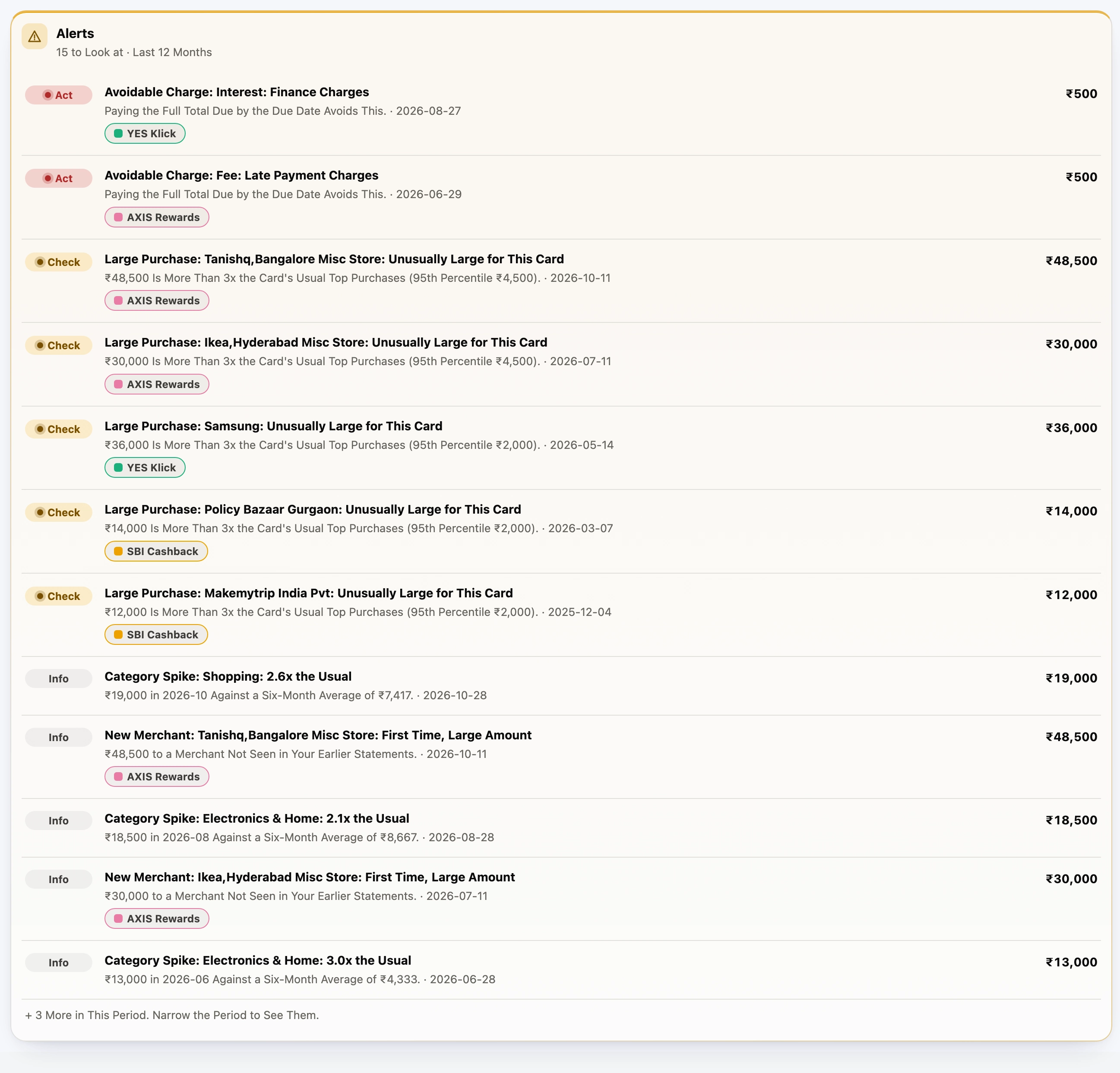
Large purchases, possible duplicate charges, new merchants with a big first charge, foreign-currency fees, avoidable late fees or interest, and category spikes.
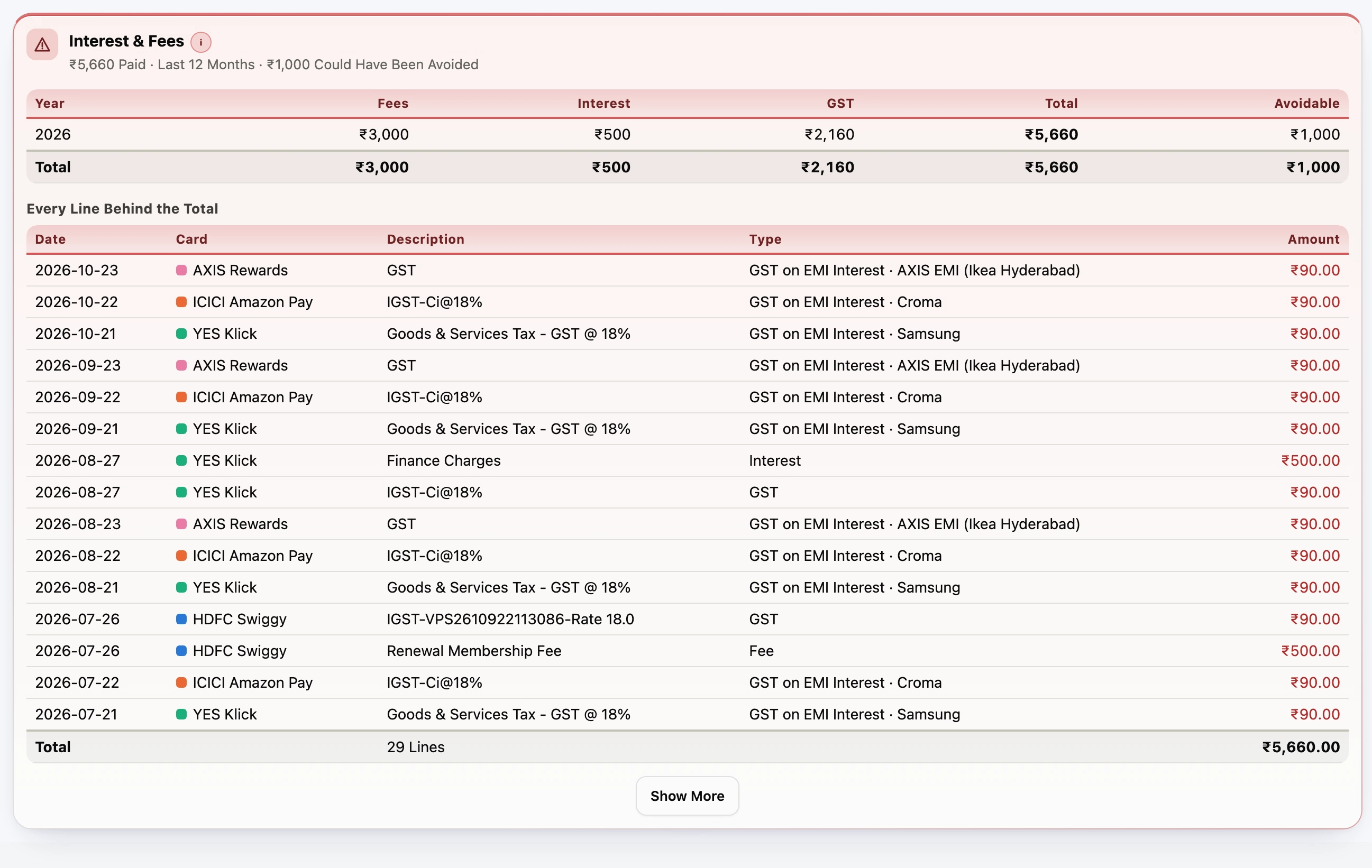
Totals by year, the part you could have avoided, and every fee, interest and GST line behind the total.
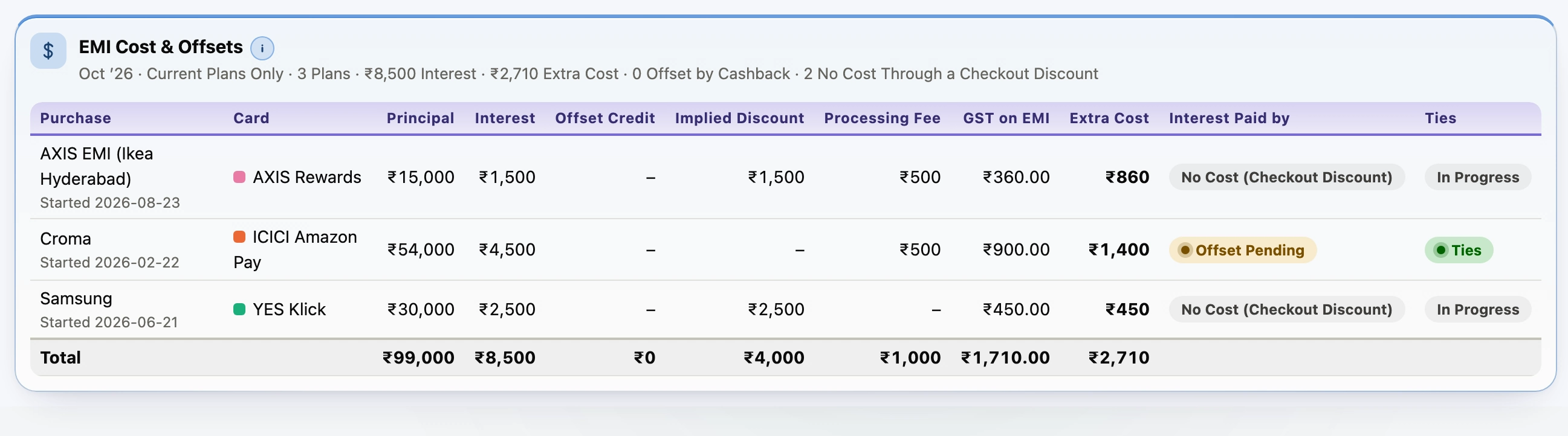
Principal, interest, processing fee and GST for each plan, plus whether a cashback offset or checkout discount covers the interest.
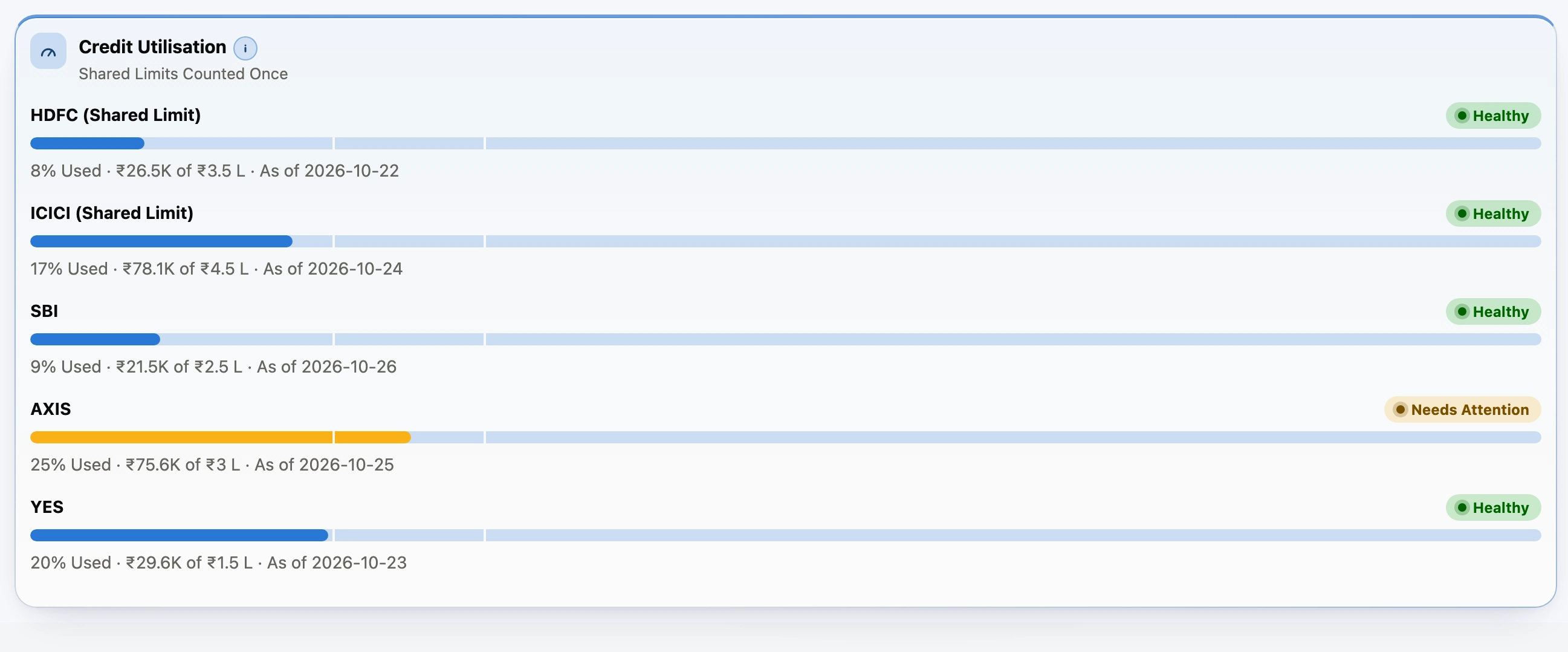
How much of each limit you use, with shared limits counted once and a clear label when a card needs attention.
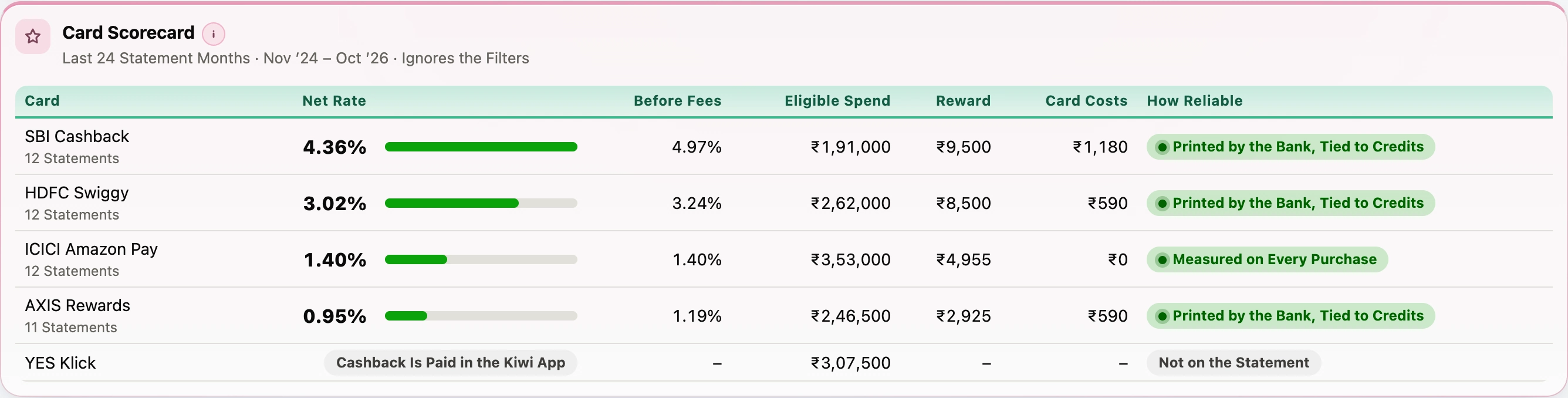
Net reward rate after fees over 24 statement months, with a note on how reliable each figure is.
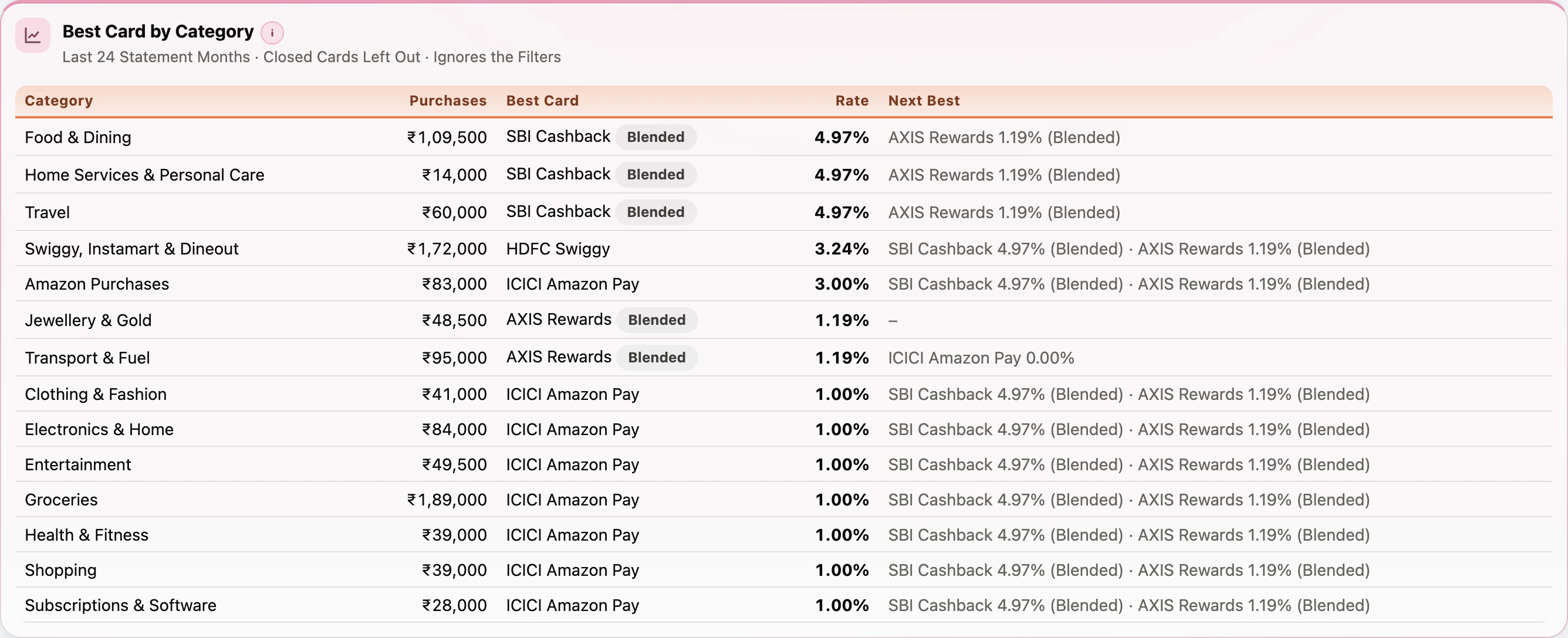
See which card earns the most for food, travel, groceries and more, and what the next best option would give.
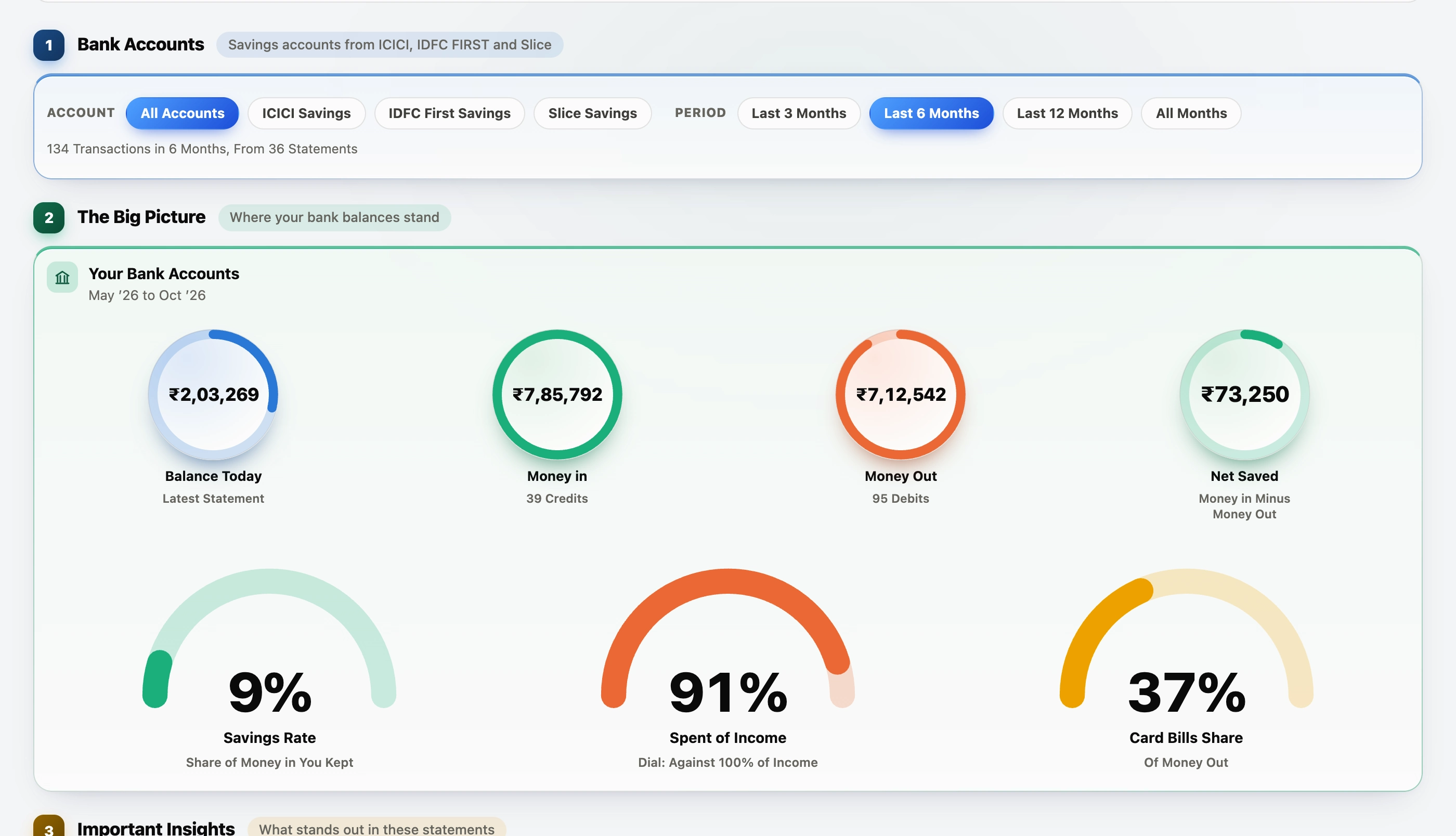
Savings statements from ICICI, IDFC FIRST and Slice, with balance, money in, money out and savings rate.
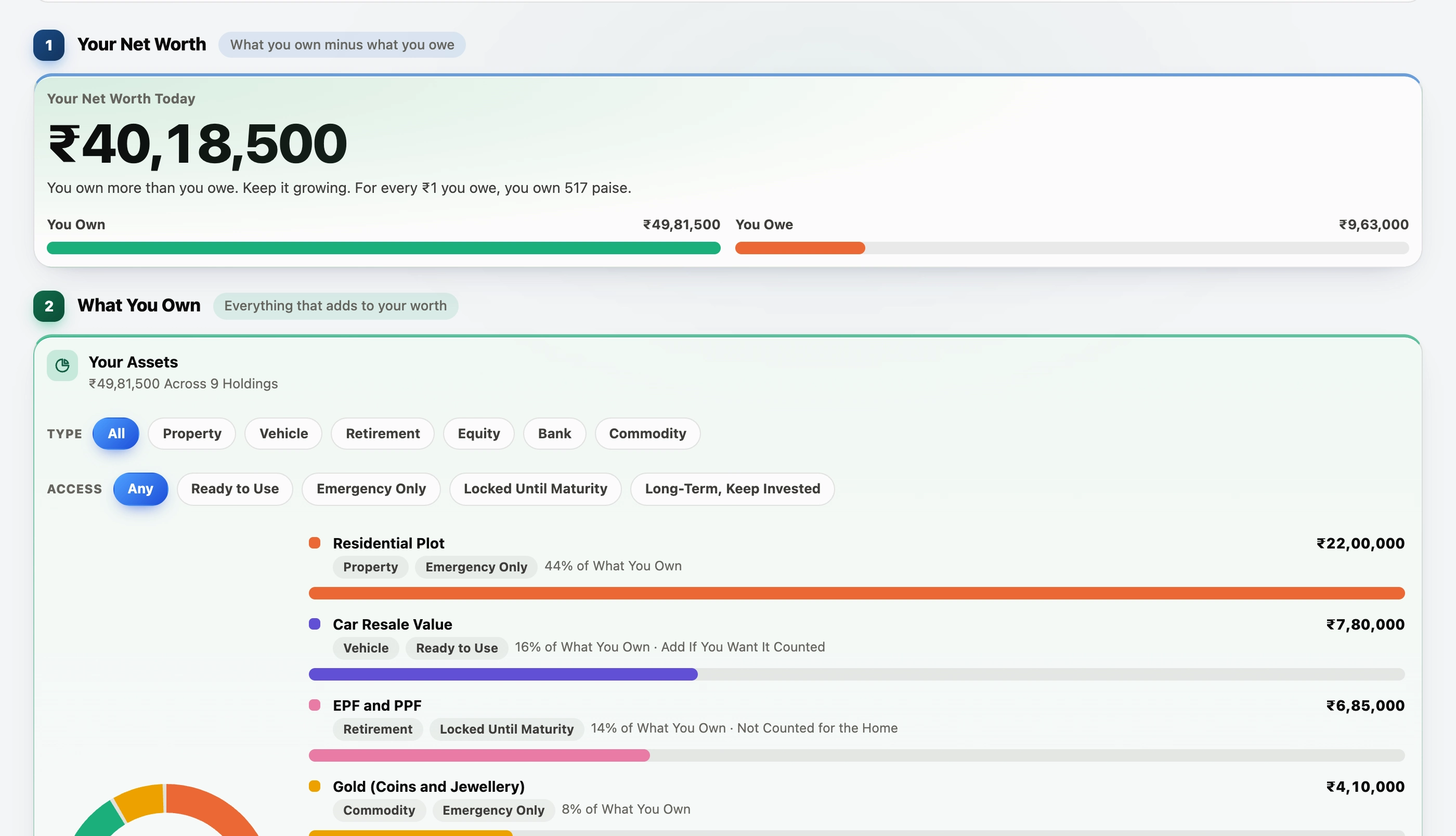
What you own, what you owe, and how quickly money can be reached, with a trend built from a daily snapshot.
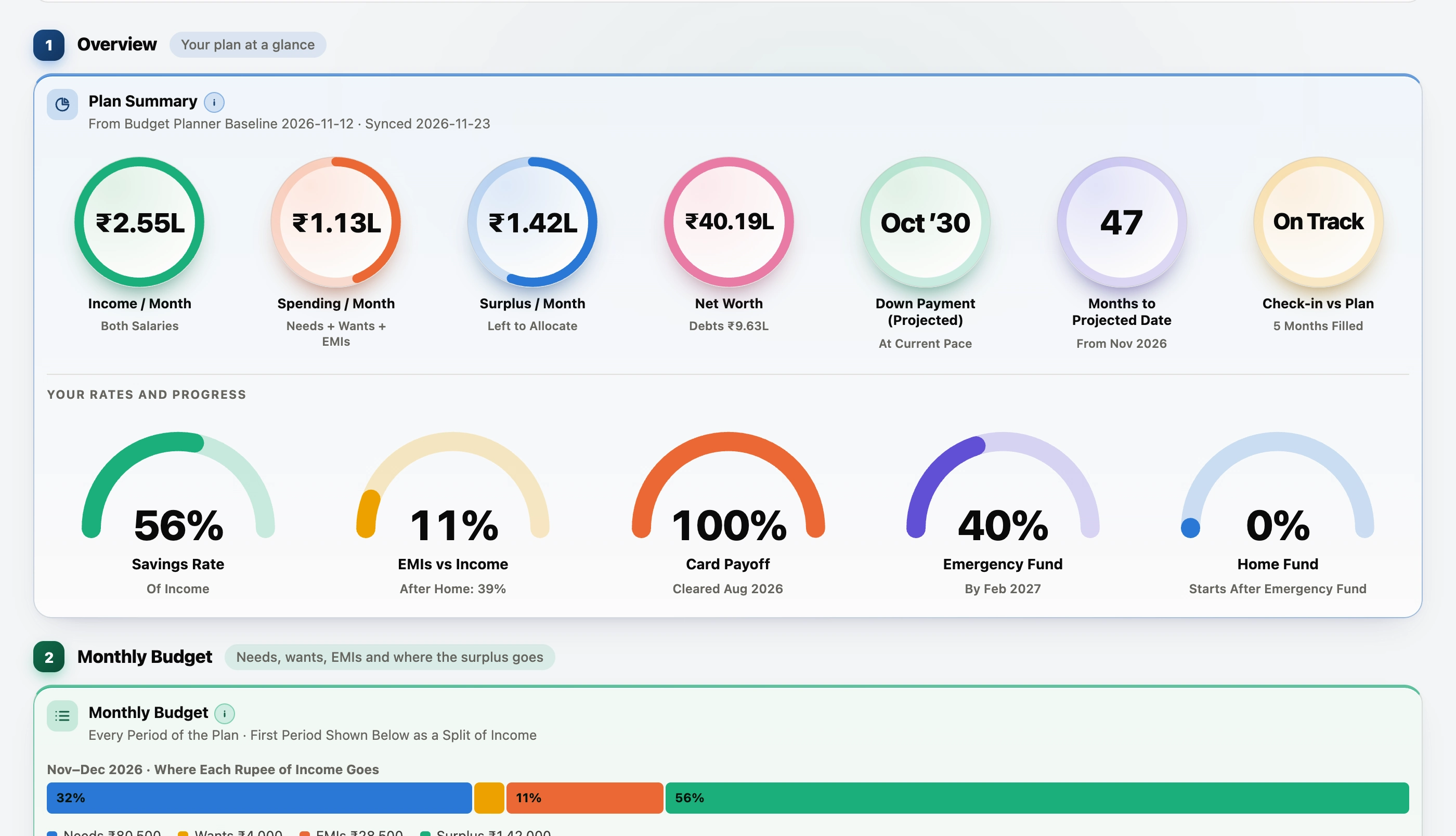
A plan summary from your own budget planner, and a budget per category with a Watch flag at 80% and Over above 100%.

Type a question such as "top 5 categories by spending last 6 months" or "which categories are over budget". It tolerates typos and shows the matching lines. It runs as fixed rules on your computer, with no AI service and nothing sent out.
Period, bank or card, category, search and a minimum and maximum amount. The headline, charts, rankings and transaction list follow.
Every transaction counts in the month of the bill it is on, and a panel lists each card's exact cycle for the month you pick.
Plain-language fund analysis. It explains, it does not tell you what to buy.
A money tool is only useful if the numbers are right. These are facts from the project's own records, taken from version 2.26.0 on 23 Nov 2026.
These numbers come from the author's own build history and will be updated at each release.
I wanted one place where every card and bank statement matched the bill I actually pay, without handing my bank login to anyone. So I built a tool that reads the PDF statements on my own computer and checks that each bill adds up.
I test it the way I would test any software that handles money. Every release is checked, and every bug I find gets a test so it cannot come back. Lekka Pathram is that tool, made ready for other people.
Shivanagaraju, maker of Lekka Pathram
Credit card statements
Savings account statements
Other banks are not supported yet. Tell us which one you need in the sign-up form, and the most requested come first.
| This tool | Spreadsheet | Aggregator-style apps | |
|---|---|---|---|
| Reads your PDFs for you | Yes | No, manual typing | Varies |
| Checks the bill adds up | Yes | Only if you build it | Varies |
| Data stays on your computer | Yes | Yes | Usually uploaded |
| Needs bank login or consent link | No | No | Often |
Feature statements are about categories of tools, not about any named product.
Bill-payment and rewards apps help you pay. Lekka Pathram helps you check what you paid. They can work side by side.
| Bill-payment and rewards apps | Lekka Pathram | |
|---|---|---|
| What each one is | ||
| Core job | Pay credit card and other bills, earn rewards, and often offer credit score checks and loans | Read statement PDFs, check each bill adds up, explain spending, fees, EMIs and card rewards |
| Where it runs | Phone apps | Mac desktop app. Windows: coming soon |
| Who can use it | Some set a minimum credit score; some link your email or cards | Anyone with a supported bank statement, no score needed |
| What each one does | ||
| Pay a credit card bill | YesCore feature, with reminders and rewards | NoNever moves money |
| Spot odd charges | VariesSome flag hidden charges or duplicate spends | YesLarge purchases, possible duplicates, new merchants, foreign-currency fees, avoidable interest |
| Check a bill adds up to the bank's total | Not a focus | YesMarked "Ties" only when lines match the statement totals |
| Statement-month view across cards | Not a focus | YesEach card's exact cycle |
| EMI true cost | Not a focusEMI costs are shown for their loans, not for card EMIs, on the listings read | YesPrincipal, interest, fee, GST, offsets |
| Real reward rate per card | Not a focusThey show the rewards they give, not the net rate across your cards | YesNet of fees, over 24 statement months |
| Best card per category | VariesSome offer card-optimisation tips | Yes |
| Net worth, budgets, goals, mutual funds | VariesSome track bank accounts or investments | Yes |
| Plain-English questions | VariesSome offer a chat assistant. What it can answer varies | YesFixed rules on your computer, no AI service |
| Data and privacy | ||
| Where your data lives | Typically on the company's servers, since payments and credit features need them | Your own computer. Statements are not uploaded |
| Sharing | Store listings declare the data collected, such as contact, financial and usage data, and some declare data used for tracking or marketing. Read each app's own policy | The app shares nothing. The site only collects waitlist emails |
Based on the public store listings and websites of popular bill-payment and rewards apps, read on 23 Nov 2026. Apps change, so check each one. This compares categories of tools, not any named product.
Tap a question to see the answer.
Your statements are read on your own computer and are not uploaded. The site only collects your email address, and the bank you need if you choose to tell us, for the waitlist.
In Telugu, lekka means accounts or reckoning and pathram means a document, so it is your account statement, read and checked on your own computer.
Each statement is marked Tied only when its lines add up to the bank's own totals. Every figure on the dashboard is also recomputed from the raw lines by a separate check before a release.
No. Questions are answered by fixed rules inside the dashboard on your computer. No AI service is called.
It runs on a Mac today. Windows is coming soon.
No. It tracks and reconciles your own statements. It is not financial, tax or investment advice.
A free demo with sample data, and a one-time Pro price to read your own statements. Waitlist members get a founding-member rate. Price to be announced.